
Subscribe

“Research” for the Perfect Home Office Road Trip

Pre-Trip Planning
June 15th, 2008 No Comments »

RVRVRVWhen I told people I was planning an RV trip, many envisioned Robin Williams’ movie RV. His character apparently drives into uncharted and adventurous highways.

I guess people envisioned similar adventures for the Zbar family’s Z-RV.

“Lola” the GPS warns him he’s “not on any marked road,” has he struggles to find a shortcut back to his family. He gets slathered in “fecal matter” when trying to dump “the rolling turd’s” tanks. He writes an entire presentation on his laptop from an RV camp’s restroom, only to find “No Signal” to transmit the document to his over-demanding boss back home. He then writes it using his BlackBerry, and suffers the same disconnected experience.

Travels With Charley by John Steinbeck

Some of the images were striking a familiar cord with me — someone who has worked from the road for years. Short of the fecal matter reference, I’ve frustrated GPS mavens by taking the Blue Ridge Parkway when she wanted us on the Interstate. And I’ve struggled to find a signal to send important emails back to clients.

Then, I discovered John Steinbeck’s Travels With Charley: In Search of America, the dying author’s tale of a cross country journey into “America on the eve of a tumultuous decade.” I guess there’s a serious — and seriously introspective — take on RVing.

I found RV Vacations For Dummies and Over-the-Road Wireless for Dummies, both from Wiley. Then I read Marcia Yudkin’s Taking Your Business on the Road, a report on how to take your business on the road — and not have it suffer in the process.

Except for Magellan and Columbus, few “explorers” today find truly uncharted territory. As pragmatists advise, why reinvent the wheel? Or, in my case, the RV adventure…
Home Office is Where the Laptop is…

Accommodations
June 10th, 2008 1 Comment »

What would you do if you had to create a home office from a space just under 169 square feet? Where would you put “your” space — to work, to focus, to ply your trade uninterrupted?

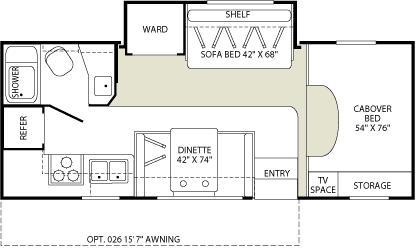
Jamboree Floorplan

That’s what I’ll face when I take my laptop, wireless Internet connection and other accessories into our Fleetwood Jamboree and try to work efficiently from a make-shift home office for three weeks.

This isn’t really a stretch. It’s bigger than my office at home, which measures right around 140 square feet. But the two are very similar in one respect: Whether it’s 169 square feet or 140, it’s not ALL workspace. In my home office, my desk takes up about 20 square feet (it’s a custom-built beauty, I humbly admit), and the shelving behind me consumes another 10 feet.

Look at the Jamboree’s floor plan, and you’ll see I won’t have much space of my own. The dinette may be my ideal space, but that’s about 21 square feet. The cab-over bed and storage will be another 29 feet. The kitchenette and bathroom are not ideal workspaces, though I’ve been known to get some pretty good reading done in the latter…

Clearly, I’ll have to improvise — and will enjoy doing so. I’ll lose the kitchen table when it’s converted into a bed, meaning my pre-dawn working hours will need some other space. With the awning stretched out, I’ll feed my unusual work chronology by working outside when the spirit and elements cooperate. I’m sure the campgrounds and RV parks we visit will have picnic tables. I’ll work as Robbie drives (oh, the beauty of wireless broadband).

As I’m learning from other RV sites, working from the road is a heavily improvised and ad hoc exercise. If you have some thoughts or suggestions, send them my way…

Departure Countdown: T-Minus 30 Days ’til Home Office Highway Hits the Road

The Road Warrior, Tour News
June 9th, 2008 No Comments »

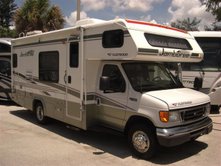
Fleetwood Jamboree (Courtesy RV Sales of Broward) Departure Countdown: One month until the RV hits the road. The partners (Office Depot and Verizon Wireless) are in place, and the family’s getting excited.

I visited our RV partner, RV Sales of Broward, to check out the recreational vehicle we’ll call home for three weeks. While it’s no John Madden-esque luxury coach, it’ll be perfect for the tour.

It’s a 23-foot Fleetwood Jamboree. It’ll sleep our family of five comfortably, and not chug the petrol like a much bigger coach. Apparently it’ll get somewhere near 10 MPG. Now I’ll know what a once-proud Hummer owner feels like as oil tops $137 a barrel.
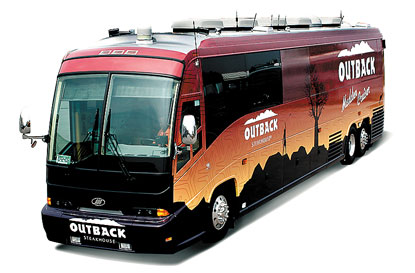
John Madden’s Outback RV

Now’s the time to start getting the fine-print details into place:

– Signage. I contacted a local vendor who’ll print and install laminate signage for the sides.

– I ordered a copy of Over the Road Wireless for Dummies (Wiley, 2006), and downloaded a copy of Marcia Yudkin’s Taking Your Business On The Road. Written from her two-month sabbatical across the U.S. and Canada, this is quickly becoming my must-read tome on the work-from-the-road advanture.

Much to do, and time’s running short. Have ideas, links or resources for me to explore? Send them along.

Wi-fi, Techno-Goodies & Preparing For a Road Trip

technology, The Road Warrior
June 8th, 2008 No Comments »

The Internet is vital to any road trip. We’ll have Verizon Wireless on board the RV. But if you need wi-fi connectivity, check out this collection of nationwide wi-fi hot spots from About.com.

The Mobile Office Technology writer Catherine Roseberry also offered these solutions and tools for mobile performance and enjoyment:

1. Mobile Edge Enhanced Wi-Fi Locator. The Mobile Edge Wi-Fi Locator is small enough to fit nicely on your keychain and doesn’t add extra bulk to your keychain. It’s easy to use and when those times arise when you don’t want to stay in a hot spot location but use your vehicle, this gadget is ideal. I was able to test the Wi-Fi locator at a couple locations and I really liked the fact that the LED display will indicate how strong the signal is.

2. Kensington Pocket Speakers: Kensington Pocket Speakers will truly fit into a pocket and are an excellent accessory for any mobile professional, especially those who are responsible for providing presentations on a regular basis. Most onboard speakers in a laptop do not provide adequate volume for use during presentations. Using the Kensington Pocket Speakers will help ensure that everyone in the room can hear what is going on.

3. Laptop Legs/Mac Feet by LapWorks Inc. Laptop Legs/Mac Feet provide an easy way to elevate your laptop on any surface without worrying about making your laptop unstable. If anyone has an older laptop or remembers the older laptops, they did have small legs but they weren’t sturdy at all and quite often broke. The Laptop Legs/Mac Feet are a well constructed and designed solution which enable you to increase airflow beneath your laptop.

4. D-Link Wireless Pocket Router/AP w/Client Mode. The biggest benefit that the D-Link Wireless Pocket Router/AP provides is the ability to combine three different capabilities in one compact mobile gadget. The DWL-G730AP can be used as an Access Point – which is very handy whenever you have to share Internet access and there is only one Ethernet connection available.

5. Targus Mobile Notebook Surge Protector. It’s important to make sure you protect the power provided to your laptop while on the road. The Targus Mobile Notebook Surge Protector is a very compact and lightweight gadget for peace of mind while working on the road. This surge protector includes two and three prong AC adapters to fit most laptops. You can use this anywhere in the world you happen to be working.

Waypoints: Putting Our Home Office Road Tour Together…

What's New With the Tour?
June 7th, 2008 No Comments »

Scotland yard four detectives by mprinke @.jpgAmerica is a great country for road trippin’. From the Tamiami Trail in South Florida to the Blue Ridge Parkway, from Route 66 to the Pacific Coast Highway, this place was created for the explorer in search of sights unexplored along the open road.

Rand McNally created a list of five great destinations. But when we hit the road on Home Office Highway, we’ll travel none of RM’s suggested paths, but hope to create some roads less traveled of our own.

We’ll explore some sights along the Eastern Seaboard. From Orlando through Jacksonville, Fla., we’ll go through the Carolinas andVirginia, through the New York Metro area, and up into Boston — then back again.

With Office Depot as a partner, we’ll bring the show to their stores throughout the journey. Though times are to be determined, the store locations we’ll visit are:

– Jacksonville, Fla., in the Highland Square Shopping Center

– Glen Allen, Va., at West Broad Street and Stillman Parkway

– Springfield, Pa., in the Olde Sproul Shopping Village

–  Union, N.J., on Morris Avenue

– Framingham, Mass., in the Shoppers World Center

We’re also working with AAA South and a handful of maps to plot our course. This will be a heckuva journey.

Any tips to share about paths to take or sites to see? Let us know…

Home Office Highway Signs RV Sales of Broward as Partner

The Road Warrior, Tour News
June 6th, 2008 No Comments »

RV Sales of BrowardCoral Springs, FL (June 6, 2008) – Home Office Highway, the digital road show and contest that this summer will showcase how consumer electronics and small business technology can empower the digital lifestyle from within a recreational vehicle, has partnered with RV Sales of Broward.

“From a compact camper to a luxury motor coach, RVs are a perfect way to have fun and work efficiently during a road trip,” said Jeff Zbar, the show’s creator and host. “Smart technology, tools and creature comforts can enable productivity from the road.”

“This promises to be an exciting, educational adventure that will highlight how the RV lifestyle and road warrior workstyle can coexist,” said Gigi Stetler, owner and CEO of Fort Lauderdale, Fla.-based RV Sales of Broward, and creator of the Riding Gigi Style line of RV linens. “Jeff and his family will show how an RV can be an ideal office.” Read More »

Road Warrior ‘Workations’: Work, Play – or Blend

technology, Telework & Virtual Officing
June 5th, 2008 No Comments »

Do you like to work when you play? How about work from ‘anywhere’? A study from Citrix Online revealed that for a growing number of American workers, the traditional office is becoming more of a touchpad than a daily destination, or one of several places we do our jobs.

And one of those places increasingly is while away on vacation or any of the popular shorter mini-vacations Americans are taking.

The study, “Web Commuting & the American Workforce,” notes that people are performing at least part of their jobs virtual – and from anywhere, at any hour of the day. How? They’re tapping various technology that allows them to “take their office with them” wherever they go. These remote workers, termed “telecommuters” in the 1980s and 90s, today are called “Web commuters” for their growing reliance on the Internet.

The rise of this ‘Web Commuter’ is changing how people view work. It’s not a place, but a result. It’s not about time, but productivity. As one saying goes, “It’s output, not hours-put.” Among the stats:

– 23% of American workers (and 41% of small business owners) regularly work from home or another offsite location, relying on Web technology (e.g. the Internet, e-mail, or programs that allow them to remotely access their office computers or meet with colleagues online).

– 62% of those who do not have this ability said they would like to be able to do so.

– 14% preferred the ability to work remotely or away from the office at least some of the time as a perk over stock options (13%) and on-site child care (11%).

70% of American workers aged 18-34 were most excited about working remotely and would welcome the opportunity.

Products like VPN, or Citrix GoToMyPC, enable people to access their computers from any Internet-enabled destination. That can include a cyber café, or your Verizon wireless broadband aircard. Today, that means work is a thing – regardless of place…


   Designed By:  WP Theme

   With some exceptions, all content © 1999-2018 Jeffery D. Zbar Inc. All Rights Reserved.